Charts you already know
Seconds to months, range and volume bars, drawing tools from trend lines to Fib projections, 16 built-in indicators, and a script editor for your own.
Free · Runs on NinjaTrader 8 · NQ · ES · MNQ · MES
Neon Ledger turns NinjaTrader into a trading city you run: a charting and order-flow platform, bots you build from menus, prop-firm rules on every account, and a phone app that keeps you in control from anywhere.
Windows · NinjaTrader 8 · first beta coming soon
The city
Each bot gets a district and each account is a tower. A tower grows with its profit toward the target, its crown shows today, and a locked account says so on its row. Click a district for its calendar, trades and copy settings.
Four looks DayPyramidsNeonCastle
The platform
Wired straight into NinjaTrader, so prices, fills and positions arrive the moment they happen. Every time on screen is New York time on a 12-hour clock.
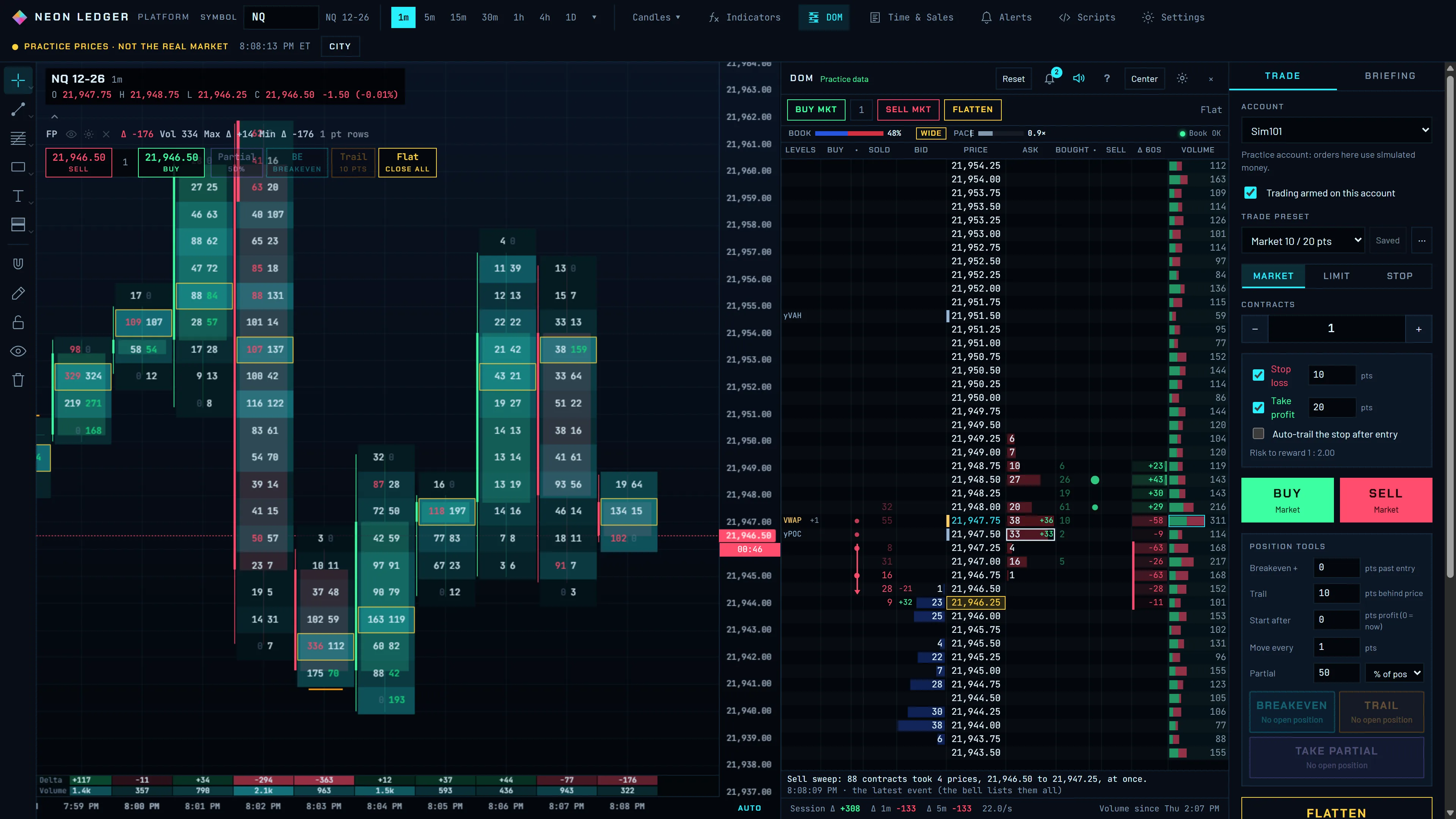
Seconds to months, range and volume bars, drawing tools from trend lines to Fib projections, 16 built-in indicators, and a script editor for your own.
A DOM ladder that marks walls, icebergs and absorption, Time & Sales, footprint, big-trade bubbles, a liquidity heatmap, delta and CVD.
Key levels, session opens and the London range, the previous day's profile, opening gaps, SMT divergence and open interest.
Presets with stop and target in points, right-click limit and stop orders at the cursor, orders you drag on the chart, breakeven, trailing stops and partials.
Set a price alert on the chart and it reaches your phone too, with the time it hit.
Every fill is logged. See a P&L calendar, trade reviews, and your numbers by day, setup and account.
Bots
Choose the levels, the setup, the confirmation, the stop, the target, the hours and the money. Neon Ledger tests the rules on your own NinjaTrader history, then runs them on paper before they touch an account.
Ready to run
ICT's Market Maker Model: liquidity taken inside a macro window, a shift on the 1-minute chart, a limit at the first fair value gap, and an SMT check against the other market.
NQ and ES · 1-minute entries · London and New York hours
Candle Range Theory on 90-minute candles: candle 2 takes one side of candle 1 and closes back inside, a 5-minute close confirms, and half comes off at the midpoint.
NQ and ES · candles from 6:00 PM ET · SMT between NQ and ES
Every bot starts on paper. You move it up one switch at a time.
Prop-firm rules
Pick your firm and plan, and Neon Ledger fills in its rules. Then it holds you and your bots to them.
When the day reaches it, the account locks until 6:00 PM ET. Closing a trade always works.
New trades stop at your firm's consistency limit, and a trade that would cross it takes its profit there.
An evaluation that reaches its target locks for good, so a good run can't be traded away.
The drawdown line follows your firm's end-of-day rule, not the intraday high.
A long and a short across one firm's accounts are refused before they reach the firm.
Mark your personal account, and nothing in Neon Ledger touches it.
Daily loss limit of $1,000 reached at 10:31 AM. Closing still works.
Reached its $3,000 target. Unlock it yourself if you mean to keep trading.
One order on the leader. Each follower gets its own order, stop and target, and a follower at its limit sits the trade out.
Phone
Charts with your drawing tools and indicators, one-tap orders from the chart, every bot's switch, and the city itself.
Setup
A setup wizard walks you through each step and tests it before you move on.
One installer finds NinjaTrader 8 and adds the Neon Ledger add-on.
Mark each account Practice, Prop firm or Never trade. Firm presets fill in the rules.
Connect your broker's or firm's data. Test lights show what arrives: prices, the order book, history.
Start MMXM or the 90-Minute CRT, or build your own. It runs on paper until you move it.
Questions
Yes. Neon Ledger is free to download and use.
Only the bots you switch on, on the accounts you choose. Every bot starts on paper, and Stop all is one tap away on your PC and your phone.
No. Prices, orders and trades stay on your PC, and your phone talks to your PC directly over Tailscale.
Some firms ban automated trading, so check your firm's rules. Neon Ledger keeps bots off a firm's accounts unless you accept that firm's rule.
Charts work with anything NinjaTrader shows. The bots and the ready-made strategies trade NQ and ES futures and their micros.
Yes, NinjaTrader 8 on Windows. Neon Ledger runs on top of it and uses your own connections.
Build your city on the NinjaTrader you already use.
First beta coming soon · Needs NinjaTrader 8